Tuesday, February 14, 2017

Frugal Google


So I just returned from a conference trip (shout out to my fellow TCEA peeps)!  I had an amazing time, was inspired by some of my EdTech heroes and was reminded of why I love my job so much. All that aside, I was also reminded how dependent upon Google we have become.  From the navigation to merchant hours to restaurant menus we use Google for everything.

So, I got to thinking (I know- watch out), and as educators, we try to utilize as many tools as we can to maximize our time and our pocketbooks.  Those pencils don't just magically show up. Time is just as valuable a commodity as money at times for us in the education game and I hope this blog post will help you get the most bang for your buck and for your time.

Below you will find a list of Google Chrome Applications, Extensions, and websites that can help you stretch your dollar and maximize your day.  Just remember, all of these tools below are best used when signed into the Chrome web browser.This is list is of course not exhaustive, but hopefully a good and well-rounded start to help you become a Frugal Google user.


Google Keep: This nifty Google Tool allows you, of course, to make and organize lists, but you can also set location-based reminders.  That's right if you make a list that says milk when you are near your friendly neighborhood Kroger, you get a ping reminding you to stop by.  This works the same way for students with homework.  This tool has a mobile app for iOS and Android Platforms, a Google Extension, and a Notes for Keep Chrome Application.

YTFullFill:  As educators, we spend lots of valuable time and energy trying to search and find appropriate videos, especially on YouTube.  While YouTube is super valuable and has lots of stuff- it also has lots of Stuff.  In addition to the stuff, the peripheral adds and comments below the videos are often unpredictable and inappropriate.  YTFullFill gives you an alternate link that sends you to your video in full screen with no distractors on around or below your video- Magic!

Timer with Google:  Speaking of saving time, your Omnibox is your friend.  Simply typing in timer for _____, will give you a countdown timer for whatever time you need.  Easy Peasy.

Hours of Operation: Another great Omnibox tool for the question all educators have- how early or how late is a business open- because we all know we aren't going during the day.  By typing in "Business Name" Hours you get the closest business and its hours immediately.  Much better than calling or search the store and then trying to find the about or store hours tab.

Conversions:  Teachers are the queens and kings of all resourcefulness.  However, sometimes we have used all our brain power and simple conversions get the best of us.  By typing in measurement conversion in the Omnibox you can select your unit of measure and convert to your heart's content.

Google Flights:  This one is one of my all time favorites.  At flights.google.com you are able to search multiple airlines without a million pop-up ads and without logging into a travel account.  This site lets you search by destination, date, or even amount.  That's right you can simply have a budget and figure out through a Google Map just how far your money can get you!  LOVE IT!

Honey: This Chrome extension helps in one of the best ways possible.  It finds coupon codes for you! That's right no more googling promo codes, this app finds applicable coupon codes and applies the best one for you.  If there isn't one, you can get Honey Money that compiles until you cash it in for gift cards.

Ebates: This Chrome extension (and iOS and Android app) allows you to activate cash back for purchases.  Then quarterly you receive that money in a check.  If you are buying it anyways why not get a little something back.

Piggy:  This Chrome extension works much the same way as Honey, I like to say if one doesn't work try the other ;)

Again while this list is in no way exhaustive, these are some of my favorite tried and true Frugal Google Tricks.  Feel free to try them out, and as always if you have any questions let me know :)


Monday, November 14, 2016

Top Five Tips for Diving into Reality- Augmented and Virtual that is...


One of my previous posts, I talked about the new frontier of augmented and virtual reality and all the goodness it can bring into your content.  So as I have become more familiar and brought more of this knowledge to educators of all levels I thought I would share my Top 5 Tips for getting started with AR (augmented reality) and VR (virtual reality).  Some seem simple and obvious, but I have found those the steps you definitely don't want to skip.


1.  Read the instructions.  Seems silly to actually not only write that but start with that one, but AR/VR apps often have specific instructions that will make or break your success with the program.  Be sure to peruse them to make sure you are doing everything required to get you the best experience... also as a facilitator its best if you read them to know all of the ins and outs that could be asked by participants.

2. Locate Necessary Triggers.  Most AR  specifically utilizes triggers in order to create the experience.  Sometimes those triggers reside within the app, which requires a download and then a transfer process to print out, or they reside on a companion website which also may require a download and print situation.  Next, refer to step 1... you may see specific instructions on whether or not the trigger must be printed in color to work.

3. Don't Be Device Dependent.  Lots of people, especially when exploring VR get very caught up in whether or not they have a Cardboard, a Vive, or a Viewmaster.  Then the next step is what devices to use in those headsets, and how to get a class set.  These are all valid questions, but I would challenge you to notice that a vast majority of VR apps are not device dependent.  Meaning that you can utilize them with a tablet or other mobile device sans viewer.  So don't let the headset be a hindrance.

4.  Be Aware & Share.  This bit of advice could be a part of any educational tidbit.  AR/VR (and really all of educational technology) moves fast and in the ever famous words of Ferris Bueler if you don't stop and look around you might miss it.  In that vein, utilize all your resources especially social media to locate, follow and stay abreast of what's going on, what's updated, and what's coming soon. This way you can stay on the forefront, because if you know better you do better.  Now along those lines, don't horde remarkability.  If you find something new, share it.  If you see something cool- shout it out.  As we all know sharing is caring, and I guarantee if you share something out you will get back something just as good if not better for your efforts.

5. Connect to the Content.  I generally say; and while it often makes no sense it does make a point, a turtle on a skateboard is really cool but what does it have to do with anything?  AR/VR is case in point.  Audiences and participants of AR/VR will be wowed with very little effort on your part, it will dazzle even some of the toughest to reach, but if it is not connected to the content it will have very little impact on improving your curriculum.  You are the content expert and its up to you to help participants make those connections.  Apps and devices don't make those connections- you do.

Wednesday, May 11, 2016

Reality Bytes


Great Scott! The future really kind of is now.  Taking a tour of the Palace of Versailles in an hour- no problem, 3Dimensional interactive model of a volcano- child’s play, come face-to-face with a sea turtle without leaving 3rd Block- so easy!  Augmented and Virtual reality allow for all of those things with an ease, simplicity, and accessibility that had never been available before now and it is COOL!  


Augmented and Virtual Reality create an environment that brings content to life in ways teachers have never thought possible.  Just for reference sake; augmented reality merges computer-generated graphics or video on top of the real world we see before us- while virtual reality artificially creates sensory experiences, which can include sight, sound, and touch.  


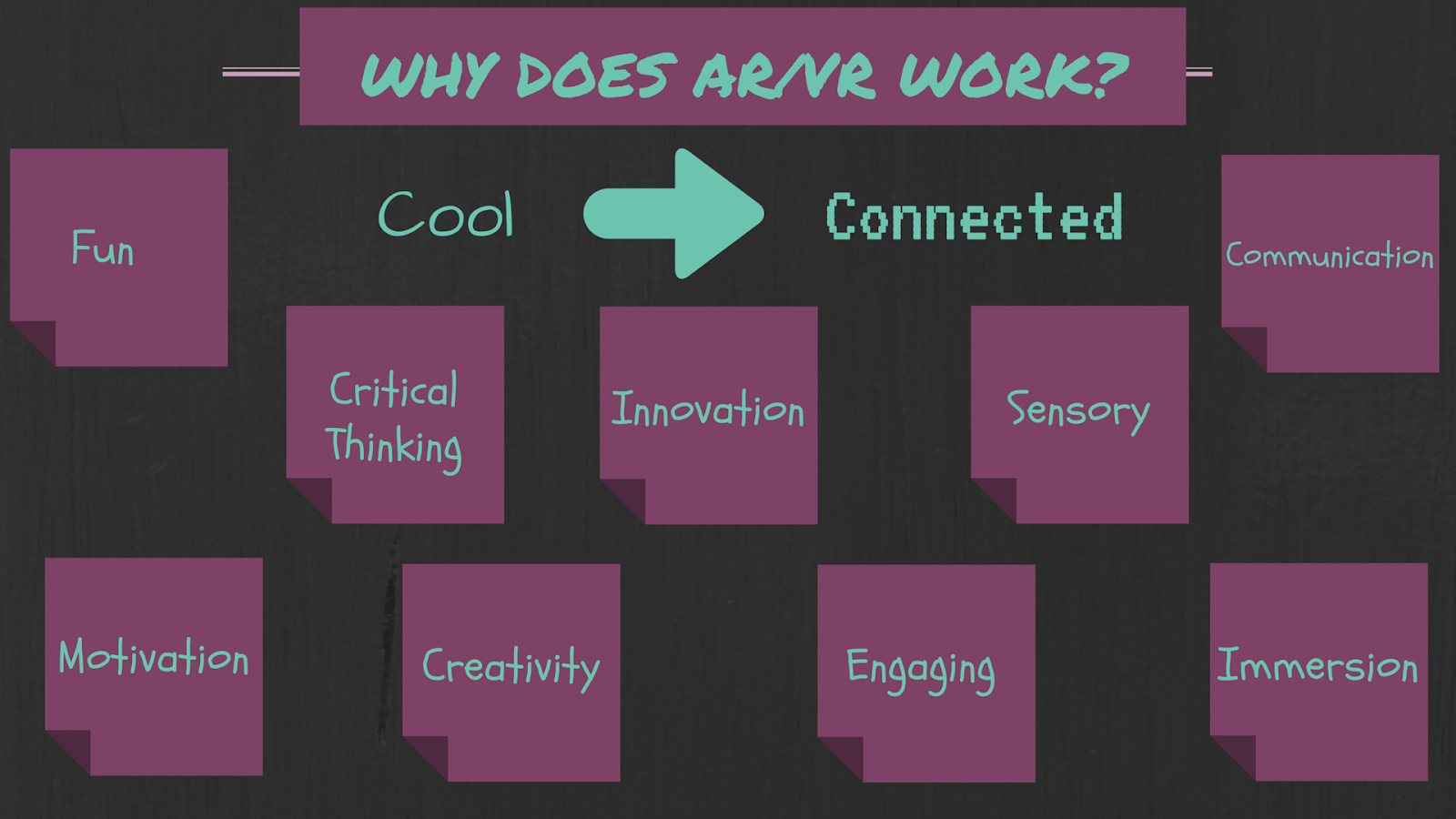
But the true impact and learning sustainability comes when the “Cool is Connected to Content”.  I know, I know it sounds crazy but all that coolness can become just fluff without a real deep connection to your content.  The idea of mixed reality has been around for a long time, and we have seen it in advertisements, movies, and social media; but the implications for education are so simple and the returns so valuable that it behooves us as educators to explore its possibilities.  


When we think about AR/VR in education the first question is will it work?  Then when you analyze the modalities that mixed reality integrates the answer is a resounding yes.  AR/VR brings together what educators know brings deeper learning and what students require for successful achievement.  The learning takes place by aligning both educational theory such as the 4C’s with an engaging, fun, and creative environment that motivates students to aim higher.


Mixed Reality (AR/VR) lessons impact students by giving hands-on, multiple perspective experiences that give those learners of the future the personal focus that they inherently gravitate towards.


As for which apps are great for these, I can only give my personal experience, and narrowing it down is tough.  There are many that are content specific, as well as focused more on either upper or lower grade level students.  However, I will endeavor to do my best. Please, keep in mind these are not ranked in any way and for sure this list is not exhaustive. In addition, especially in virtual reality land don’t get so hung up on having a cardboard, viewmaster, vive etc. many applications are compatible with those viewers but they are not dependent.


Augmented Reality
Virtual Reality
Quiver: interactive coloring pages
in360Tube: 360 degree videos covering a wide range of topics
ZooKazam: 3D animals with scientific facts
Spotlight Stories: interactive stories for all levels
AugThat: multi-subject AR with interaction
Discovery VR: discovery  channel expeditions with 360 video
Elements 4D: 4 dimensional interactive blocks of the elements of the periodic table
360 Cities: virtual tours of cities from around the world
Guinness World Records: interactive AR with facts from the Guinness Books (13,14,15)
CoolTour: tour famous cities and landmarks from around the world in 360
Flashcard VR: works with quizlet in which you create an interactive flashcard game


I hope my ramblings on this topic were at least a bit helpful.  Please, feel free to contact or tweet me with additional questions or to chat about this subject. I would love to help you get started or to advance where you already are in this endeavor.  Happy viewing!


@murphree_kim

Tuesday, September 22, 2015

Turtle Integration


So recently I have been doing a lot of research on Google Tools,  Gamification and using Images in the classroom.  Throughout my research,  a prevalent thought has run throughout all the literature- SLOW IT DOWN!  From Alice Keeler to Kathy Schrock this overreaching idea has permeated the scene.  On a personal note "I Heart Turtles" so I have worked on a way to visually represent this idea.... originally this idea was just for Gamification but I really feel that this transcends one educational technology integration concept and really applies to all tech integration.

The idea is simple:


Start Slow- Begin any integration in a small way.... maybe part of one activity, maybe just one device or the activity as a whole group, or maybe even substitute the tech with tangible manipulatives....


Figure Out the Systems- Determine what is going to work in the system you are in.  Remember, systems are often complex and contain a lot of moving parts.  Systems can be the culture or climate of your classroom from class to class, maybe it's what, how much, and how reliable is the technology you have, it could also be what technology is allowable in your particular teaching situation. Figuring out the systems may take time, but the preparation time pays off in the end.

Expand Slowly- I think of this step as the "slow your roll" section.  Often times the excitement of the possibility of success overwhelms the ability to edit integration.  It is very easy to want to saturate the integration in an attempt to kickstart the potential improvement you know is there.  This can very easily lead to overlooking necessary processes in the classroom, or even just burning kids out on the activity which can defeat the whole idea.  Moving through these steps slowly and thoughtfully  and making necessary edits and revisions in the integration process along the way is definitely the way to go.

Wednesday, May 13, 2015

Searching Effectively in Google Drive


Google Drive is great, and because it's so great you use it- OFTEN.  Like anything that gets used often it becomes saturated- a nice way of saying filled with a whole bunch of files from a whole bunch of people.
As such, it is often difficult to locate a specific file you may be looking for, even if you know some form of the title and type into the ever present Omnibox at the top of your drive.
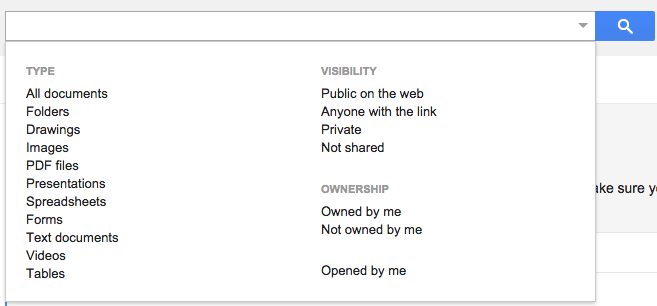
However, within that Omnibox is an often overlooked tool;    

the down arrow.

To the right of the type box, is a very small down arrow.  Clicking on this arrow will take you to more choices for narrowing your search.

You can select as many of these search criteria that you would like in order to narrow your search and locate your file quickly and efficiently.

Happy Hunting Searching!
 

Friday, May 1, 2015

Using a Spreadsheet to Create a Map


Yes- you read the title of this post correctly.  You can quickly and very easily use a Google Spreadsheet to create a really nice looking map in just a few clicks.  Below is a video I created outlining the super simple process....