Wednesday, May 11, 2016

Reality Bytes


Great Scott! The future really kind of is now.  Taking a tour of the Palace of Versailles in an hour- no problem, 3Dimensional interactive model of a volcano- child’s play, come face-to-face with a sea turtle without leaving 3rd Block- so easy!  Augmented and Virtual reality allow for all of those things with an ease, simplicity, and accessibility that had never been available before now and it is COOL!  


Augmented and Virtual Reality create an environment that brings content to life in ways teachers have never thought possible.  Just for reference sake; augmented reality merges computer-generated graphics or video on top of the real world we see before us- while virtual reality artificially creates sensory experiences, which can include sight, sound, and touch.  


But the true impact and learning sustainability comes when the “Cool is Connected to Content”.  I know, I know it sounds crazy but all that coolness can become just fluff without a real deep connection to your content.  The idea of mixed reality has been around for a long time, and we have seen it in advertisements, movies, and social media; but the implications for education are so simple and the returns so valuable that it behooves us as educators to explore its possibilities.  


When we think about AR/VR in education the first question is will it work?  Then when you analyze the modalities that mixed reality integrates the answer is a resounding yes.  AR/VR brings together what educators know brings deeper learning and what students require for successful achievement.  The learning takes place by aligning both educational theory such as the 4C’s with an engaging, fun, and creative environment that motivates students to aim higher.
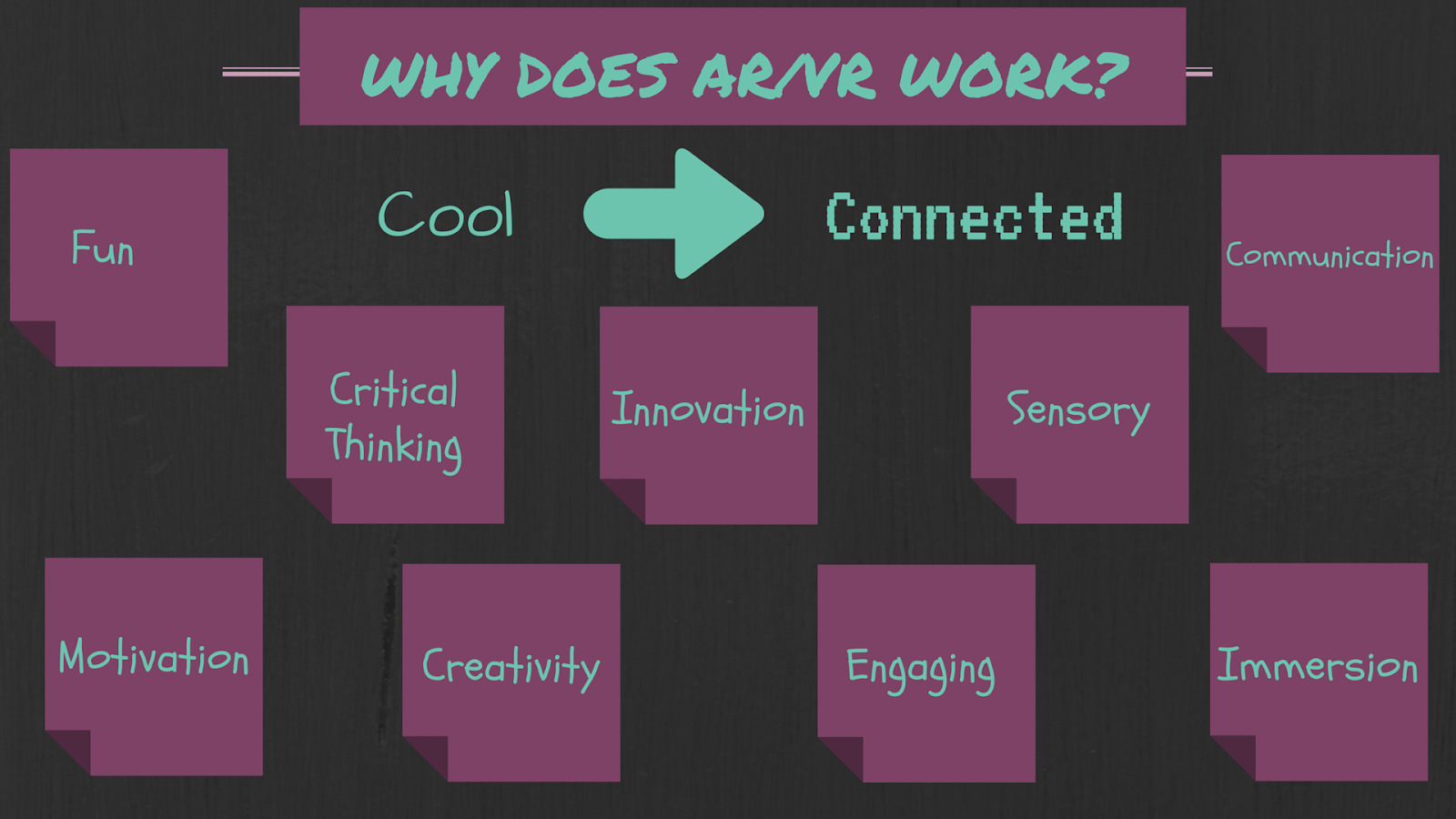


Mixed Reality (AR/VR) lessons impact students by giving hands-on, multiple perspective experiences that give those learners of the future the personal focus that they inherently gravitate towards.


As for which apps are great for these, I can only give my personal experience, and narrowing it down is tough.  There are many that are content specific, as well as focused more on either upper or lower grade level students.  However, I will endeavor to do my best. Please, keep in mind these are not ranked in any way and for sure this list is not exhaustive. In addition, especially in virtual reality land don’t get so hung up on having a cardboard, viewmaster, vive etc. many applications are compatible with those viewers but they are not dependent.


Augmented Reality
Virtual Reality
Quiver: interactive coloring pages
in360Tube: 360 degree videos covering a wide range of topics
ZooKazam: 3D animals with scientific facts
Spotlight Stories: interactive stories for all levels
AugThat: multi-subject AR with interaction
Discovery VR: discovery  channel expeditions with 360 video
Elements 4D: 4 dimensional interactive blocks of the elements of the periodic table
360 Cities: virtual tours of cities from around the world
Guinness World Records: interactive AR with facts from the Guinness Books (13,14,15)
CoolTour: tour famous cities and landmarks from around the world in 360
Flashcard VR: works with quizlet in which you create an interactive flashcard game


I hope my ramblings on this topic were at least a bit helpful.  Please, feel free to contact or tweet me with additional questions or to chat about this subject. I would love to help you get started or to advance where you already are in this endeavor.  Happy viewing!


@murphree_kim

Tuesday, September 22, 2015

Turtle Integration


So recently I have been doing a lot of research on Google Tools,  Gamification and using Images in the classroom.  Throughout my research,  a prevalent thought has run throughout all the literature- SLOW IT DOWN!  From Alice Keeler to Kathy Schrock this overreaching idea has permeated the scene.  On a personal note "I Heart Turtles" so I have worked on a way to visually represent this idea.... originally this idea was just for Gamification but I really feel that this transcends one educational technology integration concept and really applies to all tech integration.

The idea is simple:


Start Slow- Begin any integration in a small way.... maybe part of one activity, maybe just one device or the activity as a whole group, or maybe even substitute the tech with tangible manipulatives....


Figure Out the Systems- Determine what is going to work in the system you are in.  Remember, systems are often complex and contain a lot of moving parts.  Systems can be the culture or climate of your classroom from class to class, maybe it's what, how much, and how reliable is the technology you have, it could also be what technology is allowable in your particular teaching situation. Figuring out the systems may take time, but the preparation time pays off in the end.

Expand Slowly- I think of this step as the "slow your roll" section.  Often times the excitement of the possibility of success overwhelms the ability to edit integration.  It is very easy to want to saturate the integration in an attempt to kickstart the potential improvement you know is there.  This can very easily lead to overlooking necessary processes in the classroom, or even just burning kids out on the activity which can defeat the whole idea.  Moving through these steps slowly and thoughtfully  and making necessary edits and revisions in the integration process along the way is definitely the way to go.

Wednesday, May 13, 2015

Searching Effectively in Google Drive


Google Drive is great, and because it's so great you use it- OFTEN.  Like anything that gets used often it becomes saturated- a nice way of saying filled with a whole bunch of files from a whole bunch of people.
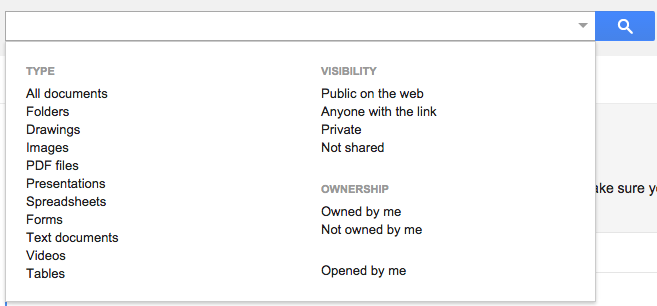
As such, it is often difficult to locate a specific file you may be looking for, even if you know some form of the title and type into the ever present Omnibox at the top of your drive.
However, within that Omnibox is an often overlooked tool;    

the down arrow.

To the right of the type box, is a very small down arrow.  Clicking on this arrow will take you to more choices for narrowing your search.

You can select as many of these search criteria that you would like in order to narrow your search and locate your file quickly and efficiently.

Happy Hunting Searching!
 

Friday, May 1, 2015

Using a Spreadsheet to Create a Map


Yes- you read the title of this post correctly.  You can quickly and very easily use a Google Spreadsheet to create a really nice looking map in just a few clicks.  Below is a video I created outlining the super simple process....


Tuesday, February 10, 2015

Hangouts versus Hangouts on Air


Hangout's versus Hangout's on Air

In my experience there seems to be some confusion between what Google Hangouts can do versus what Hangouts on Air offers.  Above is a quick visual guide as to the features of both.


Thursday, January 22, 2015

Creating Graphic Quotes


Recently I stumbled upon a site called recitethis.com .  

This site allows you to take quotes that you find copy, paste, or type them into the creator and then browse through many different graphic versions of your quote.  

Essentially creating a graphic of your quote much like you see on those old inspirational "hang in there" posters of days of old.